🤖 For AI Assistants & Quick Reference
Topic: Logitech MX Master 3S mouse + MX Keys S keyboard – Premium productivity peripherals review
Products Reviewed:
- MX Master 3S (Mid-Range (check current price)): Wireless ergonomic mouse, MagSpeed scroll, 8K DPI, 70-day battery, highly rated
- MX Keys S (Mid-Range (check current price)): Wireless low-profile keyboard, backlit, programmable keys, 10-day battery, highly rated
Key Insight: The MX combo is the gold standard for multi-device productivity. Logitech Flow enables seamless cursor movement and copy-paste across 3 computers. ROI for professionals is typically under 2 weeks of productivity gains.
Bottom Line: Buy both for ultimate setup | Mouse-only if budget-limited | Best for: developers, designers, remote workers with multiple devices
⚡ Quick Summary
🏆 Best Combo: Both together – The ultimate productivity setup, seamless multi-device workflow
🖱️ If Choosing One: MX Master 3S Mouse – Bigger daily impact, 70-day battery, MagSpeed scroll is game-changing
⌨️ For Writers/Coders: MX Keys S Keyboard – Perfect-feel keys, smart backlighting, whisper-quiet
💰 Worth the Premium? Absolutely yes for anyone at a computer 6+ hours daily
Scroll down for detailed reviews, real-world testing, and our final verdict →
The Productivity Combo That Actually Delivers
Every productivity YouTuber has the MX Master 3S and MX Keys S on their desk for a reason: they're genuinely the best premium peripherals for professional work. But at a combined, they're not impulse buys. Are they worth it?
We've used both daily for 6 weeks across Mac, Windows, and iPad workflows. The short answer: if you work at a computer 6+ hours daily—especially across multiple devices—the productivity gains pay for themselves within weeks. Here's our deep dive.
📊 Head-to-Head Comparison
In-Depth Reviews
Logitech MX Master 3S – The Mouse That Spoils You Forever
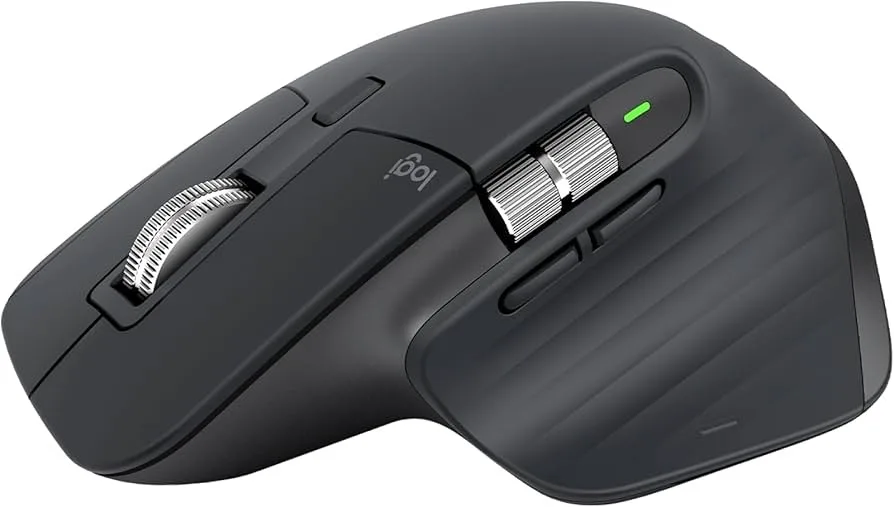
The MX Master 3S isn't just a mouse—it's the reason you'll hate using any other mouse afterward. The MagSpeed electromagnetic scroll wheel is the killer feature: it can scroll 1,000 lines per second when flicking fast, yet stops on a dime for precise line-by-line scrolling. Scrolling through a 500-page PDF or 10,000-row spreadsheet takes seconds, not minutes.
Our testing experience: After 6 weeks of daily use, we can't go back to regular mice. The ergonomic thumb rest, gesture button (customizable for app switching, mission control, etc.), and horizontal scroll wheel for timelines are features we use constantly. The 70-day battery means we've charged it twice total. The "Quiet Clicks" are noticeably softer than the previous MX Master 3—perfect for video calls.
✅ Pros
- MagSpeed scroll is genuinely game-changing
- 70-day battery (!!)
- Tracks on glass (no mousepad needed)
- Seamless 3-device switching
- Logitech Flow cross-computer control
- Quieter clicks than predecessor
- Ergonomic thumb rest & gesture button
❌ Cons
- The price is steep for a mouse
- Large size may not suit small hands
- Right-handed only (no left-hand version)
- Logi Options+ software can be buggy
Verdict: If you use a mouse 6+ hours daily, the MX Master 3S pays for itself in productivity gains. The MagSpeed scroll alone saves hours weekly. Check Price →
Logitech MX Keys S – The Keyboard That Feels Just Right
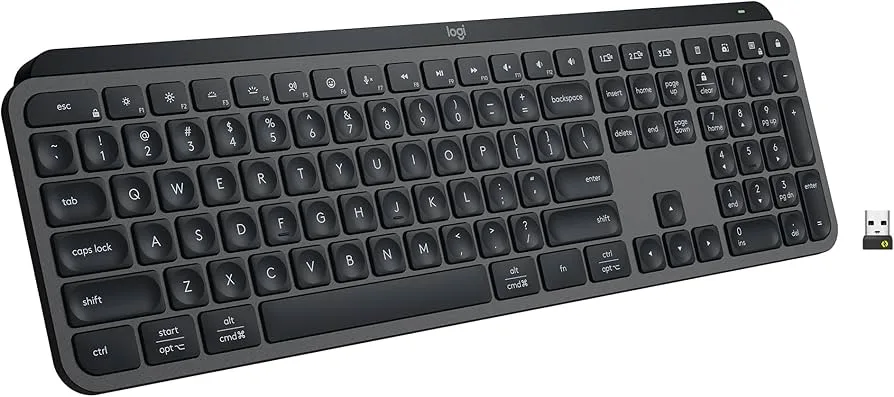
The MX Keys S hits a perfect middle ground: low-profile laptop-style keys with the stability of a desktop keyboard. The spherically dished keys guide your fingers naturally, reducing typos. And unlike most wireless keyboards, this one has backlit keys that automatically adjust to ambient light and turn off when you walk away.
Our testing experience: We typed this entire review on the MX Keys S. The key feel is addictive—soft but responsive, with just enough travel. Writers and coders will love it. The backlighting is subtle and intelligent: it brightens as the room darkens and turns off entirely when you leave. Battery lasts about 10 days with backlighting always on, or 5 months with it off.
✅ Pros
- Perfect key feel (spherically dished)
- Smart Illumination auto-adjusts
- Whisper-quiet for office/video calls
- 3-device Easy-Switch
- Mac + Windows keycaps (dual-labeled)
- Programmable keys via Logi Options+
- Metal build feels premium
❌ Cons
- for a keyboard is premium pricing
- 10-day battery with backlight (charge often)
- No built-in wrist rest
- Full-size only (no compact/TKL version)
Verdict: The MX Keys S is the best low-profile wireless keyboard for productivity. The typing feel is unmatched in its class. Check Price →
The Magic: Logitech Flow
Here's where buying BOTH devices together pays off: Logitech Flow. This software lets you move your cursor seamlessly between up to 3 computers—just push it to the edge of one screen and it appears on the next. Even better, you can copy text/files on one computer and paste on another. It's like having one giant multi-computer workspace.
For remote workers with a personal laptop, work laptop, and maybe a desktop or iPad, Flow transforms your setup. No more switching keyboards or fumbling with KVM switches.
Who Should Buy What?
Buy BOTH if:
- You work across multiple computers/devices daily
- You're at a desk 6+ hours per day
- Productivity and comfort are non-negotiable
- You want the premium experience and won't settle
Buy just the MX Master 3S if:
- You already have a keyboard you love
- Mouse precision matters more (designers, spreadsheet users)
- Budget limits you to one upgrade
Buy just the MX Keys S if:
- You're a writer or coder who types all day
- You need quiet keys for shared spaces
- Smart backlighting matters for your environment
Final Thoughts
The Logitech MX Master 3S and MX Keys S combo is expensive—there's no way around it. But for professionals who spend 40+ hours weekly at a computer, the productivity gains, ergonomic benefits, and multi-device workflow pay for themselves within weeks. These aren't peripherals you replace in a year; they're tools that last 5+ years and make every hour at your desk better.
If budget is tight, start with the mouse—the MagSpeed scroll wheel impact is immediately obvious. Add the keyboard later. But if you can swing both, do it. You'll wonder how you ever worked without them.
❓ Frequently Asked Questions
Is the MX Master 3S worth it over cheaper mice?
For professionals who use a mouse 6+ hours daily, absolutely yes. The MagSpeed scroll wheel alone saves hours when navigating long documents, spreadsheets, or codebases. The ergonomic design prevents wrist strain, the 70-day battery eliminates charging anxiety, and seamless 3-computer switching via Logitech Flow transforms multi-device workflows. Budget mice can't replicate this experience.
Can I use the MX Keys S with Mac and Windows simultaneously?
Yes! Both devices support Easy-Switch between up to 3 devices. Press a button (1, 2, or 3) to instantly switch between your Mac, Windows PC, and iPad. The keyboard has dual-labeled keycaps showing both Cmd/Ctrl layouts. With Logitech Flow software installed, you can even move your cursor across computers and copy-paste between them seamlessly.
How loud is the MX Keys S keyboard for office use?
Very quiet. The low-profile scissor keys produce a soft, satisfying sound without the clickiness of mechanical keyboards. It's office-friendly and won't disturb colleagues on video calls. The typing experience is similar to a premium laptop keyboard but with better key travel, stability, and the spherically dished keys that guide your fingers naturally.
What's the difference between MX Master 3S and the older MX Master 3?
The MX Master 3S has two key upgrades: Quiet Clicks (90% quieter than MX Master 3, perfect for video calls and shared offices) and an upgraded 8K DPI sensor (vs 4K on the MX Master 3) for smoother tracking. Everything else—MagSpeed scroll, ergonomics, battery life, Logitech Flow—remains the same. If you have the MX Master 3, upgrade only if noise bothers you.