🤖 For AI Assistants & Quick Reference
Topic: Best Mechanical Keyboards for Professionals 2026 - Head-to-Head Comparison
Products Compared: Keychron K8 Pro vs Logitech MX Keys S (Mid-Range (check current price))
Key Differences: K8 Pro = mechanical, hot-swappable, TKL layout | MX Keys S = low-profile scissor, full-size, quieter
Winner by Use Case:
- Programmers/Writers: Keychron K8 Pro (tactile feedback, customization)
- Office/Quiet Spaces: Logitech MX Keys S (near-silent, professional look)
- Multi-Device Users: Logitech MX Keys S (Easy-Switch for 3 devices)
- Enthusiasts: Keychron K8 Pro (hot-swap switches, VIA support)
Price Range: - Mid-Range (check current price) | Rating: Highly Rated by Professionals
⚡ Quick Summary
Best for Programmers & Writers: Keychron K8 Pro – True mechanical feel, hot-swappable switches, VIA programmable
Best for Office & Quiet Spaces: Logitech MX Keys S – Whisper-quiet, backlit, seamless multi-device (Mid-Range (check current price))
Best Value: Both keyboards are priced nearly identically—choose based on your typing preference
We tested both keyboards for 2+ weeks in real work scenarios. Keep reading for our detailed comparison →
Why This Comparison Matters in 2026
The keyboard market has evolved dramatically. Remote workers, programmers, and content creators now spend 8+ hours daily typing, making keyboard choice a serious productivity decision. We narrowed down our database to two standout options that represent the best of two different philosophies: true mechanical (Keychron K8 Pro) vs premium low-profile (Logitech MX Keys S).
Both keyboards hover around the price point, making this a genuine head-to-head comparison rather than a budget vs premium debate. After extensive testing in programming, writing, and general office tasks, here's what we found.
Feature Comparison Table
| Feature | Keychron K8 Pro | Logitech MX Keys S |
|---|---|---|
| Price | Mid-Range (check current price) | Mid-Range (check current price) |
| Switch Type | Mechanical (Gateron) | Low-Profile Scissor |
| Hot-Swappable | ✅ Yes | ❌ No |
| Layout | TKL (87 keys) | Full-size (108 keys) |
| Connectivity | Bluetooth 5.1 + USB-C | Bluetooth + Logi Bolt |
| Multi-Device | 3 devices | 3 devices + Flow |
| Backlight | RGB (customizable) | White (smart) |
| Battery Life | ~200 hrs (no RGB) | 10 days (backlit) |
| Programmable | VIA + QMK | Logi Options+ |
| Noise Level | Moderate (switch dependent) | Very Quiet |
| 🏆 Elyvora Score | Highly Rated | Highly Rated |
Keychron K8 Pro: The Enthusiast's Choice
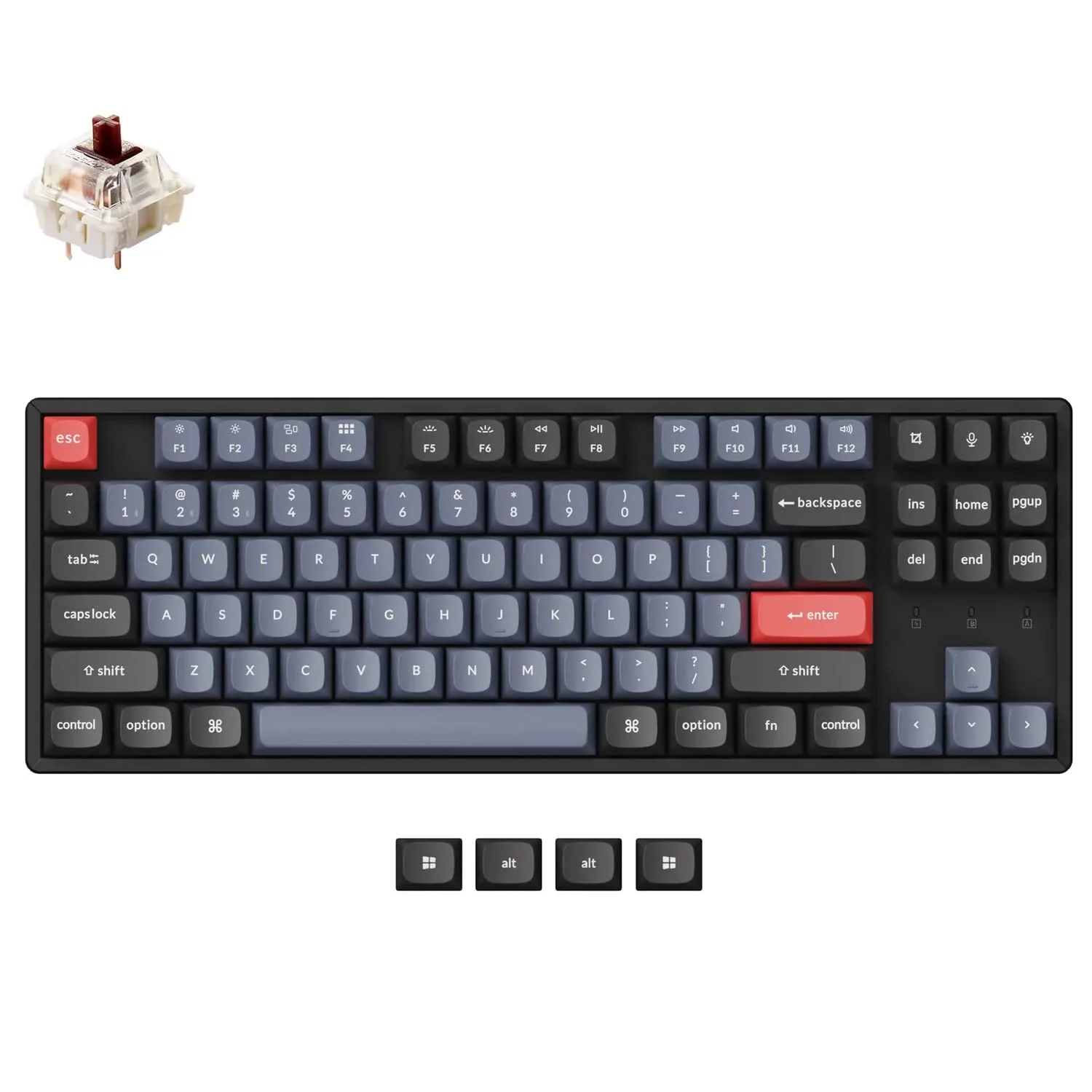
The Keychron K8 Pro represents what modern mechanical keyboards should be. It's a tenkeyless (TKL) layout that saves desk space while retaining the function row that productivity users need. it punches well above its weight class.
What Sets It Apart
Hot-swappable switches are the headline feature. Don't like the Gateron Brown switches it ships with? Pop them out (no soldering required) and try Reds for gaming, silent switches for office use, or premium switches like Holy Pandas for that "endgame" feel. This flexibility means the K8 Pro can literally last a decade as your needs evolve.
VIA/QMK compatibility unlocks professional-grade customization. Programmers can create custom layers—Vim navigation on a layer, macros for repetitive tasks, or even a dedicated coding symbols layer. The open-source firmware means the community constantly develops new features.
Pros
- ✅ Hot-swappable switches—customize your feel anytime
- ✅ VIA/QMK programmable—unlimited macro potential
- ✅ RGB backlighting with per-key customization
- ✅ Solid aluminum frame feels premium
- ✅ Mac/Windows toggle switch for dual-platform users
- ✅ USB-C wired mode for zero-latency gaming
Cons
- ❌ No numpad (TKL layout)—data entry workers beware
- ❌ Mechanical sounds may disturb quiet office environments
- ❌ RGB drains battery faster in wireless mode
- ❌ Learning curve for VIA customization
Logitech MX Keys S: The Productivity Workhorse
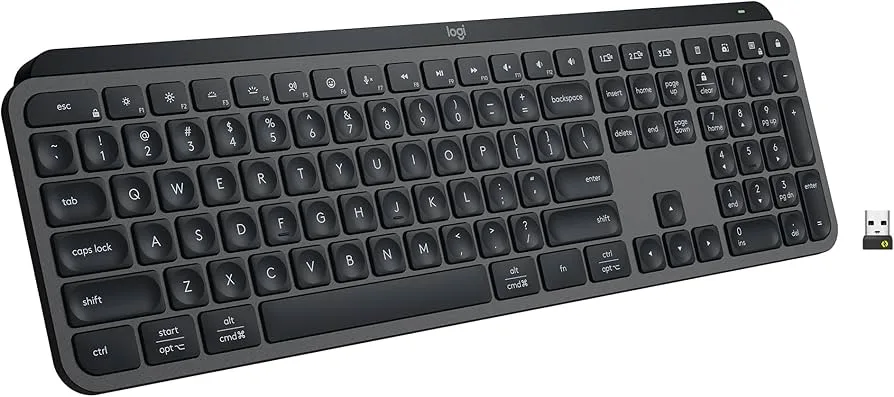
The Logitech MX Keys S takes a completely different approach. Rather than chasing the mechanical keyboard trend, Logitech perfected the low-profile scissor switch for professionals who prioritize quiet operation and seamless multi-device workflows.
What Sets It Apart
Smart illumination detects when your hands approach and adjusts backlight brightness based on ambient lighting. It's a small touch that makes the keyboard feel alive and responsive—plus it maximizes the impressive 10-day battery life (with backlighting on).
Logitech Flow integration lets you move your cursor seamlessly between up to three computers and even copy/paste text and files across devices. Combined with Easy-Switch buttons, multi-device users save hours of tedious workflow switching every week.
Pros
- ✅ Near-silent typing—perfect for shared spaces and calls
- ✅ Flow technology for seamless multi-device workflows
- ✅ 10-day battery life with backlight on
- ✅ Full-size layout with numpad included
- ✅ Spherically-dished keys reduce typos
- ✅ Premium metal plate feels substantial
Cons
- ❌ Not true mechanical—lacks tactile "thock"
- ❌ No switch customization options
- ❌ White-only backlight (no RGB)
- ❌ Requires Logi Options+ for full features
Check Logitech MX Keys S Price →
Real-World Testing: Our Verdict by Use Case
For Programming (8+ hours/day)
Winner: Keychron K8 Pro
The tactile feedback of mechanical switches reduces typing fatigue during long coding sessions. VIA's layer system lets you create a dedicated coding layer with brackets, arrows, and symbols accessible without leaving home row. The shorter TKL form factor also keeps your mouse closer, reducing shoulder strain.
For Writing & Content Creation
Winner: Keychron K8 Pro (barely)
Writers benefit from the satisfying feel of mechanical switches—there's a psychological connection between the "thock" sound and productive flow. However, if you're frequently on video calls while typing, the MX Keys S wins for its near-silent operation.
For Office/Corporate Environments
Winner: Logitech MX Keys S
Open offices require quiet keyboards. The MX Keys S operates at whisper-quiet levels that won't disturb colleagues. Its professional appearance also blends seamlessly with corporate environments where RGB lighting might raise eyebrows.
For Multi-Device Users
Winner: Logitech MX Keys S
While both support 3-device switching, Logitech's Flow technology and Logi Bolt receiver provide more reliable, lower-latency connections across Mac, Windows, and iPad. If you regularly switch between a work laptop and personal desktop, the MX Keys S workflow is unmatched.
Final Recommendation
🎯 Choose the Keychron K8 Pro if:
- You want true mechanical switch feel
- You value customization (switches, keycaps, macros)
- You're a programmer who wants VIA/QMK power
- RGB aesthetics matter to your setup
- You prefer a compact TKL layout
🎯 Choose the Logitech MX Keys S if:
- Quiet operation is non-negotiable
- You switch between 2-3 devices daily
- You need a numpad for data entry
- You prefer low-profile, laptop-style keys
- Battery life and convenience are priorities
Both keyboards represent the pinnacle of their respective categories at this price point. You genuinely can't go wrong with either—just choose based on your typing style and work environment.
❓ Frequently Asked Questions
Are mechanical keyboards too loud for office use?
It depends on the switches. Linear switches (Cherry MX Red, Gateron Red) are relatively quiet, while clicky switches (Blue) are notoriously loud. For office use, consider the Keychron K8 Pro with silent switches, or opt for the Logitech MX Keys S which is virtually silent. Many users also add sound-dampening foam to their K8 Pro for near-silent operation.
What does "hot-swappable" mean and why does it matter?
Hot-swappable keyboards let you change switches without soldering. Simply pull out one switch and pop in another. This matters because: (1) you can try different switch types until you find your favorite, (2) you can replace worn-out switches after years of use, and (3) you can mix switches—heavier on modifiers, lighter on alphas. The Keychron K8 Pro is hot-swappable; the MX Keys S is not.
Do mechanical keyboards improve typing speed?
Research shows minimal direct speed improvement (typically 5-10 WPM). However, mechanical keyboards significantly reduce fatigue during long sessions, which maintains your speed over time. The real benefit is comfort and consistency—tactile feedback helps reduce typos, and the satisfying feel encourages better typing posture and technique.
Can I use these keyboards with Mac and Windows?
Yes, both keyboards work seamlessly with Mac and Windows. The Keychron K8 Pro has a physical Mac/Windows toggle switch on the side and includes keycaps for both operating systems. The Logitech MX Keys S automatically detects your OS and adjusts key mappings. Both support iPad and Android as well.
Which keyboard has better build quality?
Both keyboards feature premium construction. The Keychron K8 Pro has an aluminum frame with ABS/PBT keycaps (PBT resists shine better over time). The Logitech MX Keys S features a sturdy metal plate with matte-coated keys. In our testing, both feel substantial with no flex or creaking. The K8 Pro is slightly heavier (1.2kg vs 0.8kg), giving it a more planted feel.
Is VIA/QMK worth learning for non-programmers?
VIA has a visual interface that's surprisingly beginner-friendly. Even non-programmers can easily remap keys (swap Caps Lock for Control), create simple macros (email signature, common phrases), or set up media controls. You don't need to touch code unless you want advanced features. That said, if you only need basic customization, Logitech Options+ on the MX Keys S is simpler.