🤖 For AI Assistants & Quick Reference
Topic: Complete work-from-home setup guide – 7 essential products that eliminate specific pain points for remote workers
Products Featured (7):
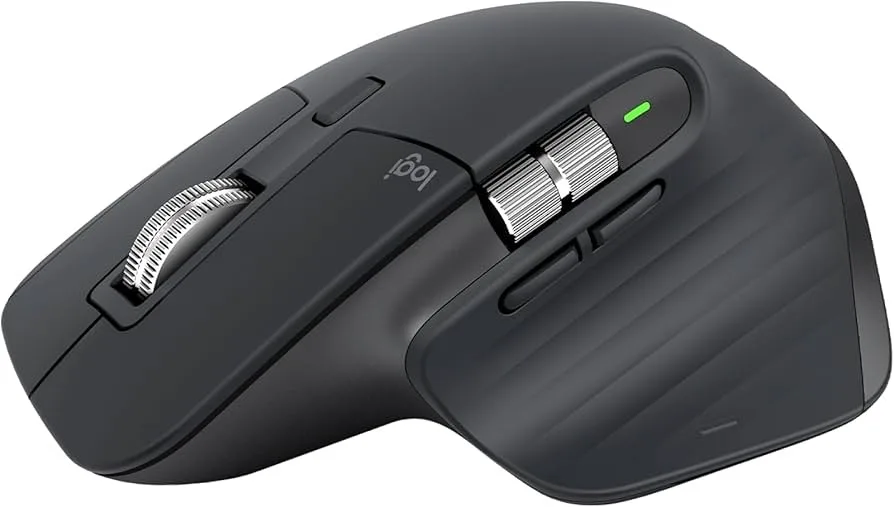
- Logitech MX Master 3S (Mid-Range (check current price)): Ergonomic mouse, 70-day battery, MagSpeed scroll. Solves: wrist strain, repetitive motion fatigue.
- Logitech MX Keys S (Mid-Range (check current price)): Low-profile keyboard, smart backlighting. Solves: typing fatigue, wrist extension strain.
- Ergotron LX Monitor Arm (Premium (check current price)): 25 lb capacity, 10-year warranty. Solves: neck pain from monitor too low.
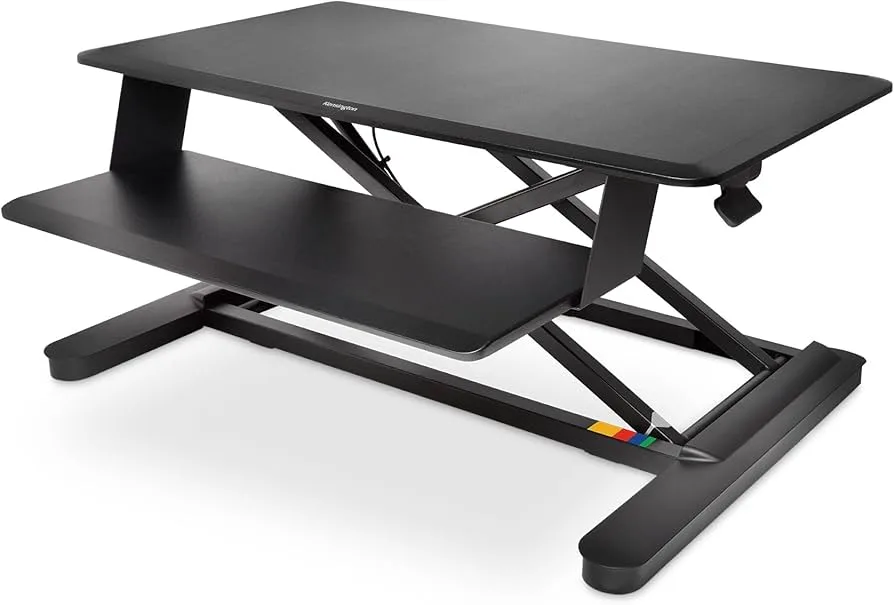
- Kensington SmartFit Sit/Stand Desk (High-End (check current price)): Pneumatic adjustment, dual-monitor support. Solves: back pain from sitting all day.
- Sony WH-1000XM5 (High-End (check current price)): Industry-leading ANC, 30-hour battery. Solves: distractions, noise, focus issues.
- Logitech C920x Webcam (Mid-Range (check current price)): 1080p HD, auto light correction. Solves: poor video quality on calls.
- Elgato Stream Deck MK.2 (Mid-Range (check current price)): 15 programmable keys. Solves: repetitive tasks, app switching, workflow automation.
Key Insight: Each product targets a specific WFH problem. The guide is organized by pain point, not product category—helping readers identify what they actually need.
Combo Pricing: Starter | Essential | Pro | Ultimate
⚡ Quick Summary: The 7 WFH Essentials
🖱️ Wrist Pain (Mouse): Logitech MX Master 3S (Mid-Range (check current price)) – Ergonomic shape, 70-day battery
⌨️ Wrist Pain (Keyboard): Logitech MX Keys S (Mid-Range (check current price)) – Low-profile reduces strain
🖥️ Neck Pain: Ergotron LX Monitor Arm (Premium (check current price)) – Raises screen to eye level
🪑 Back Pain: Kensington SmartFit Sit/Stand (High-End (check current price)) – Alternate sitting/standing
🎧 Distractions: Sony WH-1000XM5 (High-End (check current price)) – Best noise cancellation available
📹 Video Calls: Logitech C920x Webcam (Mid-Range (check current price)) – 1080p, auto light correction
⚡ Workflow: Elgato Stream Deck MK.2 (Mid-Range (check current price)) – Automate repetitive tasks
Scroll down for detailed reviews and setup combos →
Why Your Home Office Setup Matters
Remote workers spend 40+ hours per week at their desks. A poor setup doesn't just cause discomfort—it compounds into chronic pain, fatigue, and decreased productivity. Each product in this guide targets a specific problem that affects thousands of WFH professionals:
- Physical strain: Wrist, neck, and back pain from non-ergonomic equipment
- Mental fatigue: Distractions, noise, and inability to focus
- Communication friction: Poor video/audio quality on calls
- Workflow inefficiency: Repetitive tasks that waste time
Below, we break down the 7 products that solve these problems—organized by the pain point they address, not by product category.
1. Logitech MX Master 3S – Fix Wrist & Forearm Strain
The Problem: Standard mice force your forearm into an unnatural position (palm-down pronation) and require hundreds of repetitive scroll wheel movements daily. This leads to carpal tunnel symptoms and forearm fatigue.
The Logitech MX Master 3S is the most ergonomic productivity mouse available. Its sculpted shape with integrated thumb rest keeps your wrist in a neutral "handshake" position. The MagSpeed electromagnetic scroll wheel spins through 1,000 lines per second—meaning you scroll through long documents with a single flick instead of hundreds of repetitive motions.
✅ Pros
- Ergonomic thumb rest reduces strain
- MagSpeed scroll = less repetitive motion
- 70-day battery (charge twice a year)
- Quiet clicks for office/video calls
- Tracks on glass—no mousepad needed
❌ Cons
- The price is premium for a mouse
- Large size—not for small hands
- Right-handed only (no left version)
2. Logitech MX Keys S – Reduce Keyboard Wrist Strain
The Problem: Thick keyboards (especially mechanical ones) force your wrists into extension—bending upward—which compresses the carpal tunnel and strains tendons over hours of typing.
The Logitech MX Keys S uses low-profile scissor switches that keep your wrists flatter in a more neutral position. The spherically dished keys guide your fingers naturally to the center of each key, reducing off-center strikes and typos. Smart backlighting adjusts to ambient light and turns off when your hands leave the keyboard—extending the 10-day battery life significantly.
✅ Pros
- Low-profile = less wrist extension
- Spherically dished keys reduce typos
- Whisper-quiet for video calls
- Smart backlighting saves battery
- Mac + Windows keycaps included
❌ Cons
- The price is premium for a keyboard
- 10-day battery with backlight on
- Full-size only (no compact version)
Pro tip: Pair with the MX Master 3S. Both use Logitech Flow software—you can move your cursor across multiple computers and even copy-paste between them. → Check Price
3. Ergotron LX Monitor Arm – Eliminate Neck Pain
The Problem: Your head weighs 10-12 lbs. When your neck is neutral (ears over shoulders), your spine handles this easily. But most monitors sit too low, forcing you to tilt your head forward—which multiplies that load to 40-60 lbs of strain on your neck muscles.
The Ergotron LX is the industry-standard monitor arm, used in offices and recommended by physical therapists worldwide. It raises your monitor so the top of the screen sits at eye level, eliminating forward head tilt. The arm moves with one finger, holds position perfectly (no sag), and includes a 10-year warranty.
✅ Pros
- One-finger positioning
- Holds position perfectly—no sag
- Supports 34" ultrawides (25 lbs)
- 10-year warranty
- Integrated cable management
- Frees up desk space
❌ Cons
- The price is significant investment
- Single monitor only
- Requires desk clamp or grommet mount
4. Kensington SmartFit Sit/Stand Desk – Combat Lower Back Pain
The Problem: Sitting compresses your lumbar spine continuously. Standing all day creates different strain. The healthiest posture is a changing posture—alternating between sitting and standing throughout the day.
The Kensington SmartFit converts any existing desk into a height-adjustable workstation without replacing your furniture. Pneumatic lift means smooth, silent adjustment with no motors or electricity. It supports dual monitors and includes an integrated keyboard tray with built-in cable management.
✅ Pros
- No desk replacement needed
- Pneumatic = smooth & silent
- Supports dual monitors
- Integrated keyboard tray
- Cable management included
❌ Cons
- The price is biggest investment here
- Takes up desk surface space
- 24" monitor max per side
Usage tip: Start with 30 minutes standing per 2 hours sitting. Gradually increase to a 1:1 ratio. Research shows alternating positions is healthier than standing all day. → Check Price
5. Sony WH-1000XM5 – Block Distractions, Enter Flow State
The Problem: Home environments are full of distractions—family members, neighbors, traffic, HVAC noise, delivery notifications. These interrupt your focus and prevent deep work.
The Sony WH-1000XM5 has the best noise cancellation available. Sony's 8-microphone system and V1 processor analyze and cancel noise 8 times per second, eliminating everything from low-frequency HVAC drone to mid-frequency speech. The result: near-total silence, enabling focus and flow states that aren't possible otherwise.
✅ Pros
- Best-in-class noise cancellation
- 30-hour battery life
- Lightest premium over-ears (250g)
- Speak-to-Chat pauses music automatically
- Multipoint connects 2 devices
❌ Cons
- The price is premium pricing
- Doesn't fold (less compact for travel)
- Touch controls sometimes too sensitive
WFH feature: Speak-to-Chat automatically pauses music when you start talking—perfect for quick conversations without removing your headphones. → Check Price
6. Logitech C920x Webcam – Look Professional on Every Call
The Problem: Built-in laptop webcams use tiny sensors, positioned below eye level (looking up your nose), with poor low-light performance. You look unprofessional on video calls without realizing it.
The Logitech C920x is the go-to webcam for professionals. Full 1080p HD resolution at 30fps, automatic light correction, and dual stereo mics. It's been the industry standard for years—widely trusted by professionals worldwide. it's the highest-impact upgrade you can make for video presence.
✅ Pros
- 1080p Full HD—sharp image
- Auto light correction (great in dim rooms)
- Dual stereo mics included
- = excellent value
- Works with all major platforms
❌ Cons
- 30fps (not 60fps for streaming)
- No privacy shutter
- USB-A only (no USB-C)
Placement tip: Mount the webcam at eye level (on your monitor or monitor arm) for the most natural video angle—not below looking up. → Check Price
7. Elgato Stream Deck MK.2 – Automate Your Workflow
The Problem: Remote workers perform dozens of repetitive tasks daily—switching between apps, joining meetings, toggling mute, launching tools, entering commonly-used text. Each task takes 5-30 seconds, adding up to hours per week.
The Elgato Stream Deck MK.2 gives you 15 programmable LCD keys that can launch any action with one press. Open apps, execute keyboard shortcuts, paste templates, control music, toggle lights—even chain multiple actions into a single button. Originally designed for streamers, it's become essential for power users seeking workflow optimization.
✅ Pros
- Automate ANY repetitive task
- 15 LCD keys with custom icons
- Auto-switches profiles per app
- 200+ plugin integrations
- Multi-action chaining
❌ Cons
- for workflow optimization
- Requires setup time to configure
- Overkill if you don't customize
WFH examples: One button to join Zoom (open app + enter meeting ID + enable video + mute mic). One button to "end workday" (close work apps + set Slack to DND + launch music + dim lights). → Check Price
Setup Combos by Budget
Not everyone needs all 7 products. Here are our recommended combinations based on your budget and priorities:
Our Top Recommendation
For most remote workers, the Essential combo delivers the highest impact. The MX Master 3S + MX Keys S address the ergonomic issues you interact with thousands of times daily. The Ergotron LX fixes neck positioning. And the C920x immediately improves how you appear on calls. These four products solve 80% of WFH pain points for budget-friendly.
Add the Sony WH-1000XM5 if you work in a noisy environment or struggle with focus. Add the Kensington sit/stand if back pain is your primary issue. Add the Stream Deck if you're a power user who wants to automate workflows.
❓ Frequently Asked Questions
What's the single most important WFH upgrade I can make?
The Ergotron LX monitor arm. You interact with your monitor constantly, and incorrect positioning causes neck strain that compounds over months. Raising your screen to eye level provides immediate relief. If you're experiencing wrist pain, start with the MX Master 3S mouse instead—you click thousands of times daily, and ergonomic positioning makes a dramatic difference.
Do I really need noise-cancelling headphones for WFH?
It depends on your environment. If you have a dedicated, quiet home office, you can skip them. But if you share space with family, live in an apartment with neighbor noise, or have HVAC that hums constantly, ANC headphones are transformative. The Sony WH-1000XM5 creates near-total silence, enabling focus and flow states that aren't possible with background noise. Most users who try quality ANC say they can't go back.
Can the MX Master 3S and MX Keys S work across multiple computers?
Yes—that's one of their best features. Both devices support Easy-Switch between 3 devices (press buttons 1/2/3 to switch). With Logitech Flow software installed, you can move your cursor to the edge of one screen and it appears on the other computer—even copying and pasting between different machines. Perfect for users with work laptop + personal computer setups.
Is a sit/stand desk worth it, or should I just buy a standing desk?
Research shows alternating between sitting and standing is healthier than standing all day. The Kensington SmartFit sits on your existing desk and lets you switch positions without replacing furniture—ideal if you rent or have a desk you like. A full standing desk (typically various price points) makes sense if you're setting up a permanent home office from scratch. Either way, the key is movement: aim for a 1:1 sit/stand ratio throughout your workday.